
 Future
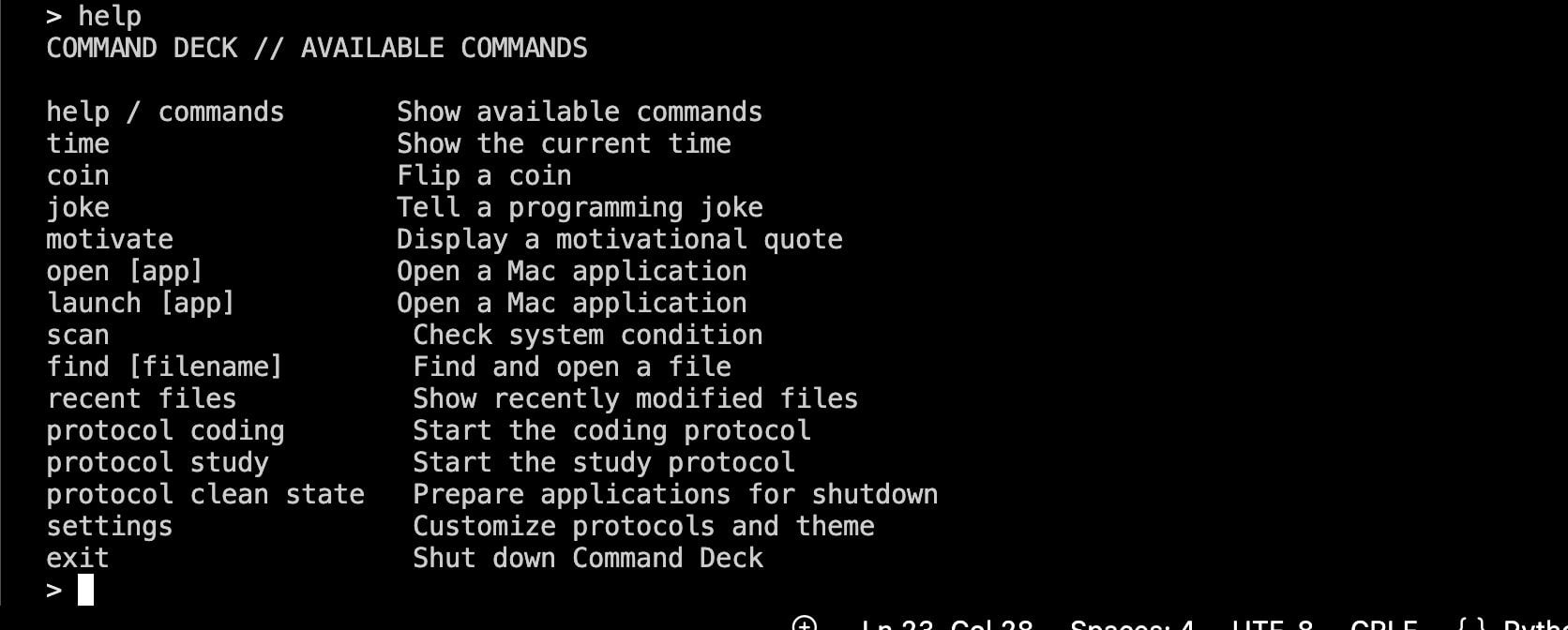
A python terminal assistant that helps user control their mac from one place in a futuristic way. It turns typed commands into real Mac actions I built this to organize commands in one place and to learn more about python.
- 12.9h
- Coding
- Python
- Top language
Command Deck
Command Deck is a Python terminal assistant for macOS. It turns short typed commands into real Mac actions, including opening applications, finding files, checking system information, and starting automated work protocols.
Why it feels futuristic
Instead of manually opening several apps and websites or searching through folders, Command Deck lets the user control those actions from one command center. A single protocol can prepare the Mac for coding, studying, or closing work.
Requirements
- macOS
- Python 3.9 or newer
- Internet access for web links and the network-status check
- Git is optional, but useful for cloning the repository
The required Python packages are listed in requirements.txt:
psutilrequests
Check your Python version:
python3 --version
Installation
Clone the repository and enter its folder:
git clone https://github.com/srinivasagudi0/Command-deck.git
cd Command-deck
Create and activate a virtual environment:
python3 -m venv .venv
source .venv/bin/activate
Install the dependencies:
python3 -m pip install -r requirements.txt
Run Command Deck
From the project folder, run:
python3 app.py
When the > prompt appears, type a command and press Return. Start with:
help
Type exit to close Command Deck.
macOS permissions
Command Deck only needs permissions for the actions you choose to use.
- Files and Folders: Needed by
findandrecent filesto search Desktop, Documents, and Downloads. If macOS asks, allow access for the terminal application you are using. - Automation: Needed by Study and Clean State protocols to control Safari and request applications to quit. Go to System Settings > Privacy & Security > Automation and allow Terminal, iTerm, or VS Code when prompted.
- Network access: Needed to open websites and check whether the Mac is online.
- Accessibility: Normally not required.
- Full Disk Access: Not required because Command Deck only searches Desktop, Documents, and Downloads.
Clean State sends a normal quit request—it does not force quit applications. macOS or the application may still ask you to save unsaved work.
Commands
| Command | What it does | Example |
|---|---|---|
help or commands | Shows the command list | help |
time | Shows the current time | time |
coin | Flips a virtual coin | coin |
joke | Displays a programming joke | joke |
motivate | Displays a motivational quote | motivate |
future | Displays Command Deck's vision | future |
open [app] | Opens an installed Mac application | open safari |
launch [app] | Another way to open an application | launch vscode |
scan, check, or health | Displays system information | scan |
find [name] | Searches for matching files and lets you open one | find homework |
recent files | Shows up to 10 recently modified files | recent files |
protocol coding | Opens the configured coding workspace | protocol coding |
protocol study | Opens study tools and optionally clears distractions | protocol study |
protocol clean state | Requests configured applications to quit | protocol clean state |
settings | Opens protocol, confirmation, and theme settings | settings |
exit | Closes Command Deck | exit |
Protocols
- Coding: Opens configured tools such as VS Code, Terminal, ChatGPT, GitHub, Hackatime, and Spotify.
- Study: Opens Safari, Notes, and ChatGPT. It can also close configured distracting Safari tabs and applications after confirmation.
- Clean State: Requests enabled applications to quit so the Mac is ready for shutdown or a fresh session.
Open settings to enable or disable individual protocol actions, change the user name, control close confirmations, and select a terminal theme.
Notes
- Application commands only work when the requested application is installed.
- ChatGPT and Spotify can open their websites when their Mac applications are unavailable.
- File commands search only Desktop, Documents, and Downloads.
- Command Deck is designed specifically for macOS because it uses the macOS
opencommand and AppleScript.
Built by Srinivasa Gudi for Future YSWS by Hack Club.